
1. Add ATS Mobile SDK to Project
The ATS Mobile SDK is DeprecatedLiveRamp has made the decision to sunset the ATS Mobile SDK effective September 30, 2026 and transition all clients to ATS API. For more information, see our announcement, or check out "ATS API Implementation Guide for Mobile Publishers".
The first step to utilize the SDK is to add our ATS mobile SDK to your project. We offer two ways to do this; via Gradle integration or a manual integration.
Gradle Integration
First, add our repository to repositories inside project-level build.gradle as follows,
allprojects {
    repositories {
        // Liveramp repository
        maven {
            url "https://sdk-android-prod.launch.liveramp.com"
        }
    }
}
Or in the settings.gradle as shown below.
dependencyResolutionManagement {
    repositoriesMode.set(RepositoriesMode.PREFER_SETTINGS)
    repositories {
        ...
        // Liveramp repository
        maven {
            url "https://sdk-android-prod.launch.liveramp.com"
        }
    }
}
Then, you can add the SDK to the application as any other dependency in your application build.gradle file.
Make sure to include the latest version of the ATS SDK within "com.liveramp:ats:$lrVersion" as shown in the below example.
dependencies {
    // Artifact group and id
    implementation("com.liveramp:ats:$v2.8.0") {
        transitive = true
    }
    ...
    // Other application dependencies
}
Use the Latest SDK VersionTo benefit from the newest features and performance improvements, we recommend to periodically update your SDK to the latest version.
Check the Changelog page to view the latest version and get informed when a new version is available.
Manual Integration
- Download the latest version of the SDK.
- Copy the .aar file below to your project libs folder.
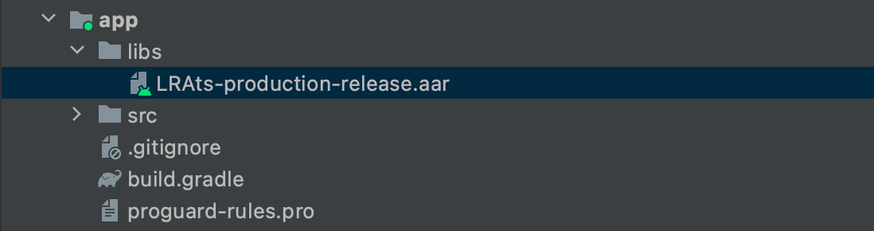
- Implement SDK in the app level build.gradle dependencies:
implementation files('libs/LRAts-production-release.aar')- Add the SDK’s transitive dependencies inside the app level build.gradle file:
implementation "androidx.preference:preference-ktx:1.2.0"
implementation "org.jetbrains.kotlinx:kotlinx-serialization-json:1.2.0"
implementation "com.squareup.retrofit2:retrofit:2.9.0"
implementation "com.jakewharton.retrofit:retrofit2-kotlinx-serialization-converter:0.8.0"
implementation "androidx.room:room-runtime:2.4.2"
kapt "androidx.room:room-compiler:2.4.2"
implementation "androidx.room:room-ktx:2.4.2"
implementation "androidx.lifecycle:lifecycle-process:2.4.1"
implementation "androidx.preference:preference-ktx:1.2.0"
implementation "org.jetbrains.kotlinx:kotlinx-serialization-json:1.2.0"
implementation "com.squareup.retrofit2:retrofit:2.9.0"
implementation "com.jakewharton.retrofit:retrofit2-kotlinx-serialization-converter:0.8.0"
implementation "androidx.room:room-runtime:2.4.2"
annotationProcessor "androidx.room:room-compiler:2.4.2"
implementation "androidx.room:room-ktx:2.4.2"
implementation "androidx.lifecycle:lifecycle-process:2.4.1"Updated 25 days ago
What’s Next
Once the SDK has been added to your project, you must initialize it.