
Secure Signals for Mobile Publishers
Google's Secure Signals feature lets publishers pass identity signals — such as identity envelopes — to select bidders alongside ad requests. Mobile publishers implement this by building a small custom adapter inside their app. The Google Mobile Ads (GMA) SDK calls this adapter at ad time to collect and pass the signal to Google's ad server.
The components below work together to pass the signal from your app to bidders:
- Google Mobile Ads (GMA) SDK: Google's SDK for requesting and displaying ads in mobile apps. It manages the lifecycle of ad requests and mediation, including loading and calling custom adapters.
- Google Ad Manager (GAM): Google's ad serving platform. You or your ad ops team registers your adapter class name here, configures which bidders receive your signals, and manages yield groups and custom events.
- Secure Signals: A GAM feature that lets publishers attach first-party identity signals to outgoing ad requests. GAM collects these signals from registered adapters and forwards them to downstream bidders.
- Custom adapter: A small class you build and ship inside your app target. It conforms to the GADRTBAdapter protocol and is registered in GAM by a class name of your choosing. When the GMA SDK requests a signal, the adapter reads the current envelope from your envelope manager and returns it.
Prerequisites
Make sure you have completed the following prerequisites:
- You have an ATS API implemented on your app to retrieve and refresh envelopes. See “ATS API Implementation Guide for Mobile Publishers” for more information.
- In your Google Ad Manager account, make sure:
- LiveRamp Secure Signals are allowed
- Third-party bidders can receive Secure Signals
For GAM instructions, see Google's article "Share secure signals with bidders and curation partner".
Process Overview
The diagram below describes how your custom adapter work with Google GMA SDK to pass signals to enabled bidders.
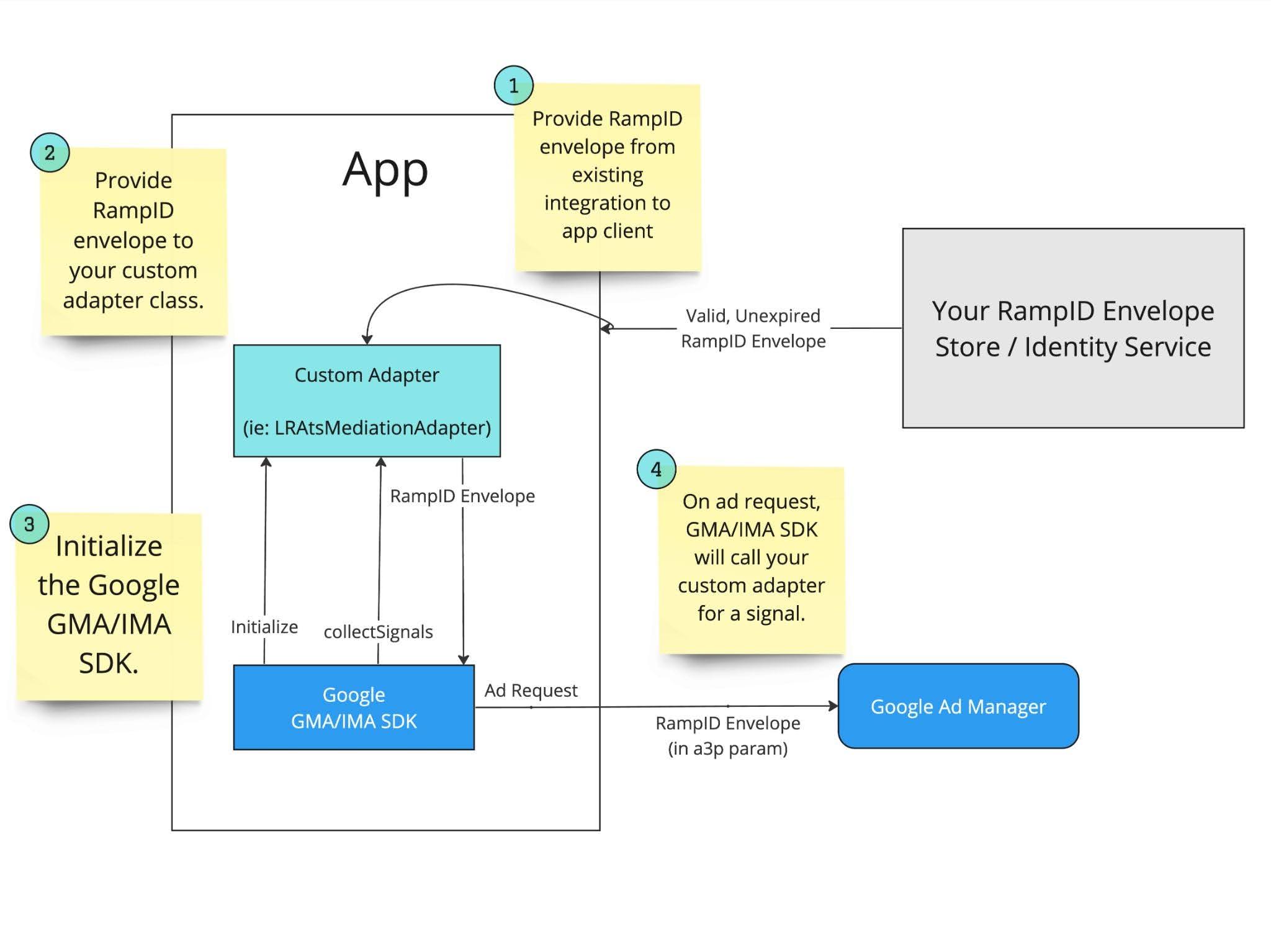
- Your app retrieves a valid envelope via ATS API and makes it available to the adapter.
- Your app explicitly initializes the GMA SDK.
- The GMA SDK loads your custom adapter by the class name registered in Google Ad Manager.
- On an ad request, GMA SDK calls on your custom adapter for a signal.
- Your custom adapter reads and returns the envelope as the signal.
- The GMA SDK collects signals from all adapters and sends them to Google's ad server.
- Google forwards the envelope in the bid request to downstream bidders configured to receive LiveRamp signals.
- Enabled bidders takes action on the provided signal.
Creating a Custom GMA Adapter
LiveRamp has reserved the below adapter class names for GMA SDK as part of the ATS Mobile SDK.
Android: com.liveramp.ats.LRAtsMediationAdapter
iOS: LRAtsMediationAdapter
To ensure signals can be passed downstream without the ATS Mobile SDK, you must:
- Replace the above adapter with your own
GADRTBAdapterclass in Google Ad Manager UI and your app. - For iOS, replace the
LRAtsMediationAdapterclass name in xcframework to the new class name.
Engineering and the ad ops team must agree on the class name before implementation, because the string in GAM and the class name in your app must match exactly.
For instructions on implementing the adapter class with ATS API, see the articles below:
GMA Adapter Sample Implementations
The examples below use LRAtsMediationAdapter as a placeholder name. Replace LRAtsMediationAdapter with the class name you defined in Google Ad Manager UI before use.
iOS (Objective-C)
The example below implements the GADRTBAdapter protocol. You are only required to implement the required parts for signal collections.
Example LRAtsMediationAdapter.h :
#import <Foundation/Foundation.h>
#import <GoogleMobileAds/GoogleMobileAds.h>
@interface LRAtsMediationAdapter : NSObject <GADRTBAdapter>
+ (void)setIdentifier:(String*)externalEnvelope;
@end
Example LRAtsMediationAdapter.m :
/*
  DISCLAIMER:
  This is reference code.
 */

#import "LRAtsMediationAdapter.h"

static NSString * _providedRampIDEnvelope;

@implementation LRAtsMediationAdapter {
}


// Note: In this "custom" adapter, the LiveRamp SDK is not used.
// GMA will look for `LRAtsMediationAdapter`
+ (void)setUpWithConfiguration:(GADMediationServerConfiguration *)configuration completionHandler:(GADMediationAdapterSetUpCompletionBlock)completionHandler {
    completionHandler(nil);
}


// Suggestion: Expose a method to set this value from an existing integration
+ (void)setIdentifier:(NSString*)externalEnvelope {
    _providedRampIDEnvelope = externalEnvelope;
}


- (void)collectSignalsForRequestParameters:(nonnull GADRTBRequestParameters *)params completionHandler:(nonnull GADRTBSignalCompletionHandler)completionHandler {

  // Note: If this value is not set; we suggest responding with an empty string as a signal.
  if (!_providedRampIDEnvelope) {
      completionHandler(@"", nil);
      return;
  }

  // Return your provided RampID envelope here in the onSuccess callback.
  // Google will insert this value into subsequent GMA SDK calls.
  // Your signal can be found in the `a3p` query parameter
  completionHandler(_providedRampIDEnvelope, nil);

}


+ (GADVersionNumber)getVersionString {
    GADVersionNumber version = {0};
    return version;
}


+ (GADVersionNumber)adSDKVersion {
    GADVersionNumber parsedVersion = [self getVersionString];
    return parsedVersion;
}


+ (GADVersionNumber)adapterVersion {
    GADVersionNumber parsedVersion = [self getVersionString];
    return parsedVersion;
}


@end
Android (Java)
This example extends this required RtbAdapter class. You are only required to implement the required parts for signal collections.
Example LRAtsMediationAdapter.java class gist:
/*
  DISCLAIMER:
  This is reference code.
 */

package com.liveramp.ats;

import android.content.Context;

import androidx.annotation.NonNull;

import com.google.android.gms.ads.AdError;
import com.google.android.gms.ads.VersionInfo;
import com.google.android.gms.ads.mediation.InitializationCompleteCallback;
import com.google.android.gms.ads.mediation.MediationConfiguration;
import com.google.android.gms.ads.mediation.rtb.RtbAdapter;
import com.google.android.gms.ads.mediation.rtb.RtbSignalData;
import com.google.android.gms.ads.mediation.rtb.SignalCallbacks;

public class LRAtsMediationAdapter extends RtbAdapter {

    private static String providedRampIDEnvelope;

    // Suggestion: Expose a method to set this value from an existing integration
    public static void setExternalRampIDEnvelope(String externalEnvelope) {
        providedRampIDEnvelope = externalEnvelope;
    }


    @Override
    public void initialize(@NonNull Context context, @NonNull InitializationCompleteCallback initializationCompleteCallback, @NonNull List<MediationConfiguration> list) {

      // Note: In this "custom" adapter, the LiveRamp SDK is not used.
      // GMA will look for `com.liveramp.ats.LRAtsMediationAdapter`
      initializationCompleteCallback.onInitializationSucceeded();

    }


    @Override
    public void collectSignals(@NonNull RtbSignalData rtbSignalData, @NonNull SignalCallbacks signalCallbacks) {

        // Note: If this value is not set; we suggest responding with an empty string as a signal.
        if (providedRampIDEnvelope == null) {
            signalCallbacks.onSuccess("");
            return;
        }

        // Return your provided RampID envelope here in the onSuccess callback.
        // Google will insert this value into subsequent GMA SDK calls.
        // Your signal can be found in the `a3p` query parameter
        signalCallbacks.onSuccess(providedRampIDEnvelope);
    }


    @NonNull
    @Override
    public VersionInfo getSDKVersionInfo() {
        return getSdkVersion();
    }

    @NonNull
    @Override
    public VersionInfo getVersionInfo() {
        return getSdkVersion();
    }

    private VersionInfo getSdkVersion() {
        return new VersionInfo(0, 0, 0);
    }
}
Updated 3 months ago