
Pass Identity Envelopes to the Bidstream
You can utilize the identity envelopes in a mobile in-app environment to improve in-app monetization with your programmatic partners. You can do this by passing them into the bid stream.
This is typically done as a getter and setter method inside your in-app header bidder, or mediation SDK partner, by adding the identity envelope to your existing ad requests.
LiveRamp is working with several partners that support setting identity envelopes in their SDKs, and passing them into their programmatic bidstreams. See the instructions below based on the partner you are working with.
Talk to Your LiveRamp RepresentativeIf you haven't yet, talk to your LiveRamp representative to discuss which solution will suit you best for passing your envelopes into the bid stream and how we can help you with monetizing.
Before You Begin
If you are implementing the ATS Mobile SDK, you must fetch Identity Envelopes using getEnvelope before passing them to a partner.
Identity envelopes have a TTL (time to live) of 15 days, after which they will be invalidated. By calling getEnvelope regularly, the SDK will refresh the envelopes on your behalf ensuring your consent data is up-to-date.
Learn more about the getEnvelope method for iOS and Android.
Prebid (SDK)
Prebid offers an open source solution for in-app mobile monetization. You can pass envelopes from ATS Mobile SDK to a Prebid server instance from the Prebid iOS/Android SDK by adding the envelope as an ExternalUserId:
externalUserIdArray.add(new ExternalUserId("liveramp.com", "<liverampEnvelope>", null, null));externalUserIdArray.append(ExternalUserId(source: "liveramp.com", identifier: "<liverampEnvelope>"))For more information, see the Prebid SDK documentation for iOS or Android SDK.
InMobi
InMobi allows in-app publishers to pass identity envelopes into InMobi's exchange using their UnifID service. There are two ways you can pass envelopes to InMobi:
- Use the ATS Mobile SDK to generate the envelopes and pass them to InMobi's UnifID service using
setPublisherProvidedUnifiedId.
val unifiedIds = JSONObject().put("liveramp.com", envelope)
InMobiSdk.setPublisherProvidedUnifiedId(unifiedIds)
var idDictionary = ["liveramp.com": envelope]
IMSdk.self.setPublisherProvidedUnifiedId(idDictionary)- Use InMobi’s own SDK to generate and pass envelopes. See InMobi's SDK Specifications to learn how.
Pubmatic
LiveRamp requires Pubmatic OpenWrap SDK V2.5.0 and aboveWork with your Pubmatic account manager to ensure you have the latest Pubmatic iOS/Android SDK in your existing application.
If you are working with Pubmatic, you can pass envelopes from ATS Mobile SDK through Pubmatic OpenWrap SDK to configured OpenWrap partners.
You can pass the envelopes to Pubmatic like below:
// Set the envelope you get from ATS Mobile SDK here
// It MUST be liveramp.com to work
var userId = POBExternalUserId(source: "liveramp.com", andId: "<liverampEnvelope>")


// Add the ID to OW SDK
OpenWrapSDK.addExternalUserId(userId)
// Set the envelope you get from ATS Mobile SDK here
// It MUST be liveramp.com to work
POBExternalUserId adServerUserId = new POBExternalUserId("liveramp.com","<liverampEnvelope>");
// Add the ID to OW SDK
OpenWrapSDK.addExternalUserId(adServerUserId);See the following documentation in Pubmatic's portal to learn more (login to Pubmatic required):
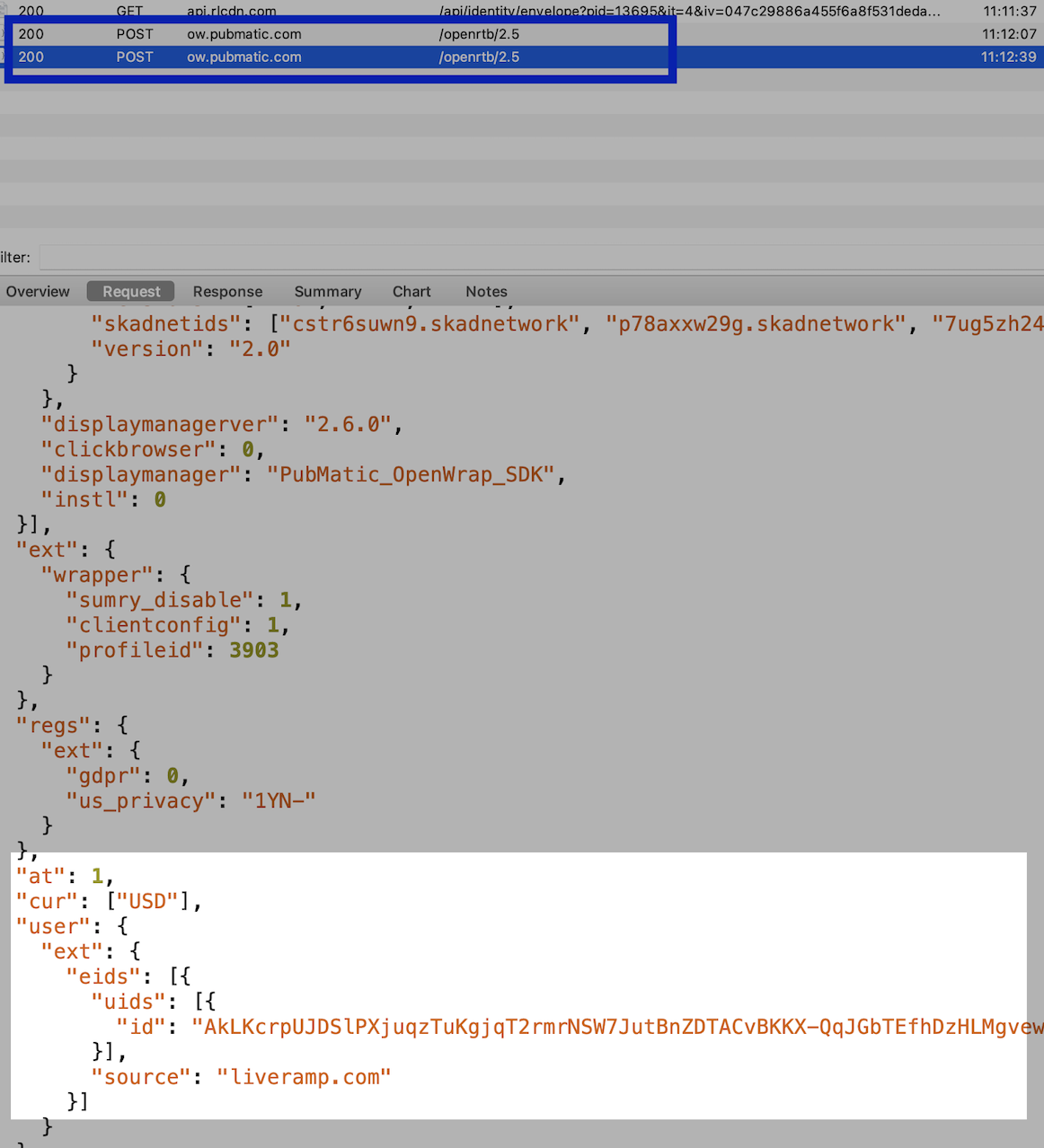
To verify that an envelope is being used in an ad request, look for the POST request from https://ow.pubmatic.com/openrtb/2.5. Verify that the envelope is present under user.ext.eids.uids.
If everything is correct, you should also see liveramp.com as the "source".
Nimbus
LiveRamp requires Nimbus SDK V2.1.0 and aboveWork with your Nimbus account manager to ensure you have the latest Nimbus iOS/Android SDK in your existing application.
Nimbus SDK allows you to pass envelopes to Nimbus' exchange. There are two ways you can do this:
-
Use the ATS Mobile SDK to generate envelopes and pass the envelopes to Nimbus SDK. For example:
NimbusAdManager.addExtendedId(
      source = "liveramp.com",
      id = envelope,
      extensions = mapOf("rtiPartner" to "idl"),
)
var extendedId = NimbusExtendedId(source: "liveramp.com", id: envelope) extendedId.extensions = ["rtiPartner": NimbusCodable("idl")] /* Setting extendedIds more than once will clear the previous results and is nil by default */ NimbusAdManager.extendedIds = [extendedId] -
Use the Nimbus-LiveRamp extension to generate and pass envelopes. For more information, see Nimbus' documentation for Android and iOS.
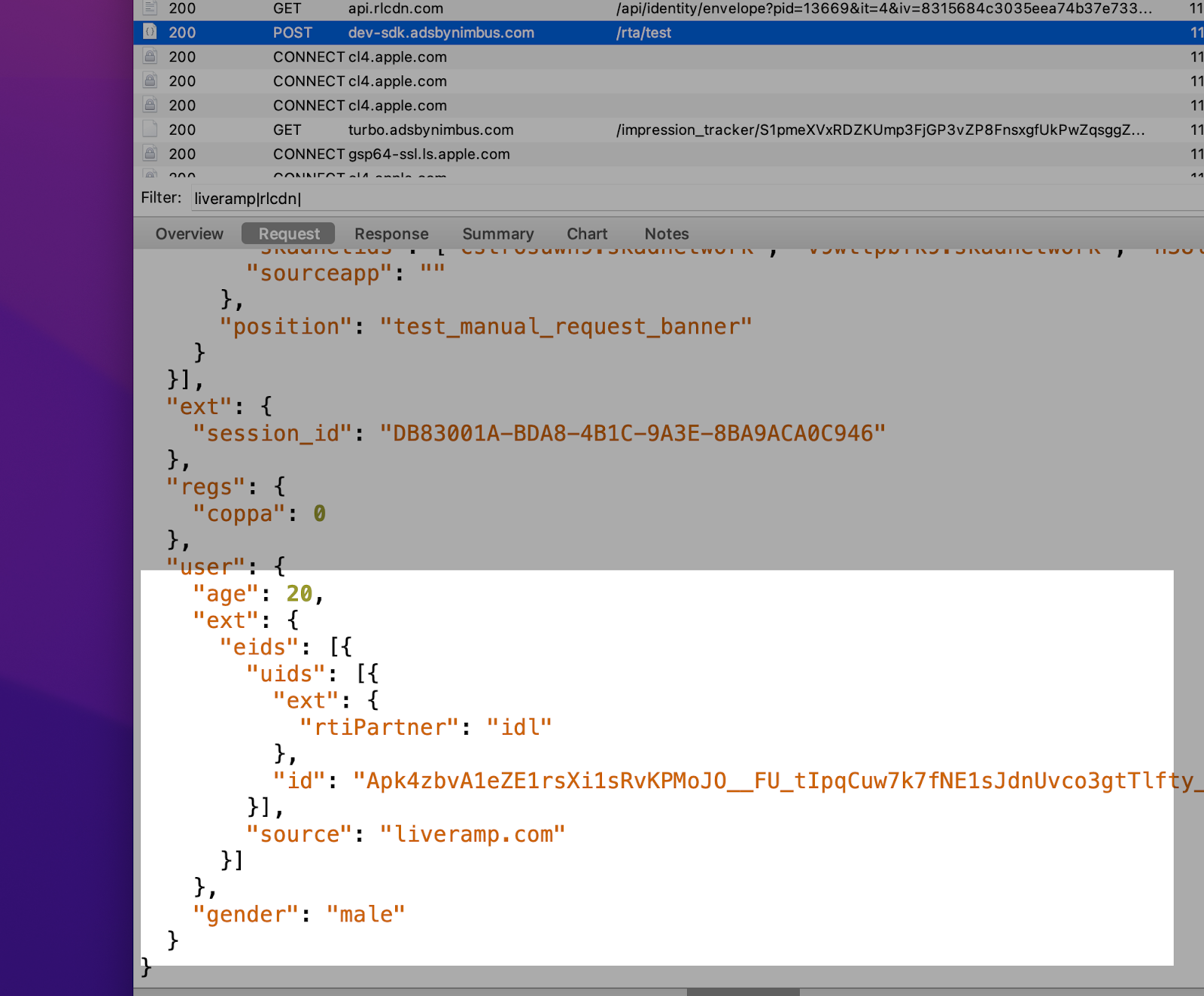
To verify that an envelope is being sent to Nimbus, look for the POST request from .adsbynimbus.com. Verify the identity envelope is present under user.ext.eids.uids.
If everything is correct, you should also see liveramp.com as the "source".
MobileFuse
Work with your MobileFuse account manager to ensure that you have the latest MobileFuse iOS or Android SDK in your existing application.
MobileFuse's SDK allows you to pass RampID Envelopes to MobileFuse's exchange - MFX.
There are two ways you can do this:
- Use the ATS Mobile SDK to generate identity envelopes, and then pass them to MobileFuse using
MobileFuseTargetingData:
// Pass in a RampID Envelope here
[MobileFuseTargetingData setLiveRampEnvelope: @"<liverampEnvelope>"];// Pass in a RampID Envelope here
MobileFuseTargetingData.setLiveRampEnvelope(“<liverampEnvelope>”)- Use MobileFuse's SDK to generate and pass identity envelopes. See MobileFuse's documentation to learn how or reach out to your MobileFuse account manager.
To verify that an identity envelope is being sent to MobileFuse , you can leverage a HTTP proxy tool (like Charles), and look for the POST request from MobileFuse. Verify that the LiveRamp envelope is present under user.ext.eids.uids.
If everything is correct, you should also see liveramp.com as the "source". For example:
{
    "user": {
        "ext": {
            "eids": [{
                "source": "liveramp.com",
                "uids": [{
                    "id": "AvAPLiE-oU_cYmbXgyM0YCOXEnRg489A51pX2uvjoZx5f8V_1yzB_nkAQ5wICpnk2s_Iw1MvC0DL2sqkbzbtJSbEy9IWp5AYnJcL"
                }]
            }...
AppLovin MAX (SDK)
Notify your AppLovin account manager that you'd like to provide your identity envelopes to the AppLovin exchange and your MAX bidders.
You can pass envelopes to AppLovin MAX fto AppLovin MAX by adding the RampID Envelope as an extra parameter in AppLovinSdkSettings:
AppLovinSdkSettings settings = AppLovinSdk.getInstance( context ).getSettings();
settings.setExtraParameter( "liveramp.com", "<liverampEnvelope>" );
let settings = ALSdk.shared()?.settings
settings?.setExtraParameterForKey("liveramp.com", value: "<liverampEnvelope>")For more information, see AppLovin's MAX SDK documentation on how to pass identifier tokens for iOS or Android.
Updated 4 months ago