
The ats.js Quickstart Guide
The ats.js Quick Start Guide provides quick instructions to help you quickly take full advantage of the Authenticated Traffic Solution (ATS).
Implement ATS via ConsoleThe LiveRamp Publisher Console provides an easy-to-use wizard for ATS implementation. Rather than make requests to support or tinker with ATS Javascript directly, use the Console to easily make your desired selections and updates with confidence.
See "Implement ATS via Console" for more information.
The easiest way to use ats.js is with Prebid.js.
This guide walks you through the following tasks:
- Visit the Prebid download page and select the following:
- The latest version of Prebid
- Adapters that support IdentityLink (such as OpenX, Triplelift or Pubmatic)
- The
User ID: IdentityLink IDmodule. If you will be processing traffic from the EU/EEA, includeConsent Management - GDPR. We recommend, but do not require, that you includePublisher Common IDto provide first-party device identifiers to demand.
- Download the newly-compiled prebid.js and replace the old copy.
- Update the prebid configuration information.
pbjs.setConfig({ userSync: { userIds: [{ name: "identityLink", params: { pid: 'REPLACE_ME' // Set your real identityLink placement ID here }, storage: { type: "cookie", name: "idl_env", // create a cookie with this name expires: 7 // cookie can last for seven days } }], syncDelay: 3000 // 3 seconds after the first auction } }); - Update the adapter parameters if you're adding new partners.
2. Add ats.js
Add the following tags for ATS at the end of the<body>tag to include and start the library on your site.
<script>
var atsScript = document.createElement('script');
atsScript.onload = function() {
  window.ats.start({
    "placementID": REPLACE_ME,
    "storageType": "localStorage",
    "detectionType": "scrapeAndUrl",
    "urlParameter": "env",
    "cssSelectors": [
      "input[type=text]",
      "input[type=email]"
    ],
    "logging": "error"
  });
};
atsScript.src = 'https://ats.rlcdn.com/ats.js';
document.body.appendChild(atsScript);
</script>
Many more configuration options are available and it's recommended to directly pass user identifiers when possible.
3. Test Your Install End-to-End
Check that ats.js is working
After entering a supported identifier, see if ATS resolved it to an envelope by opening the developer console and running window.ats.retrieveEnvelope();. If an envelope string value is returned, then ats.js is working.
Check that prebid.js is working
- Reload a prebid-enabled page on your site.
- Open the developer console and enter
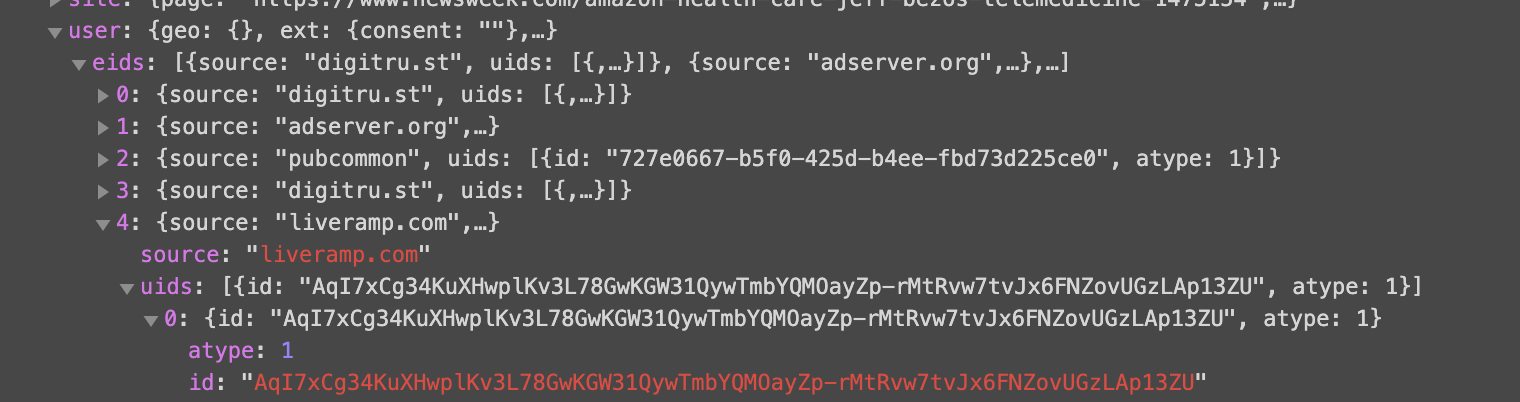
pbjs.getUserIds();to ensure that Prebid returns a LiveRamp identity envelope. - Switch to the "Network" tab and see if the envelopes are being pushed to SSPs in ad calls. Pubmatic's
POSTtohttps://hbopenbid.pubmatic.com/translator?source=prebid-client, for example, is easy to check, looking for something like the below screenshot:
Updated about 1 month ago
Looking to maximize the benefit of your ats.js implementation? Consider activating OpenIDL on your cookieable inventory.